After the selection of blocks, sub-blocks and single descriptors to be used for PCA calculation, the user can analyse the PCA results in the 'Principal Component Analysis' window. In particular, it is possible to:
Looking at PCA results separately
In the drop-down list placed at the top of the 'Principal Component Analysis' window, it is possible to select the block (or sub-block) of descriptors used to calculate the shown PCA results, depending on options chosen in the descriptor selection for PCA. The names of the blocks (or sub-blocks) are automatically given, but can be edited by the user by clicking on the button placed on the top right side of the form. Note that if PCA is calculated several times in the same work session, results are iteratively added in the drop-down list.
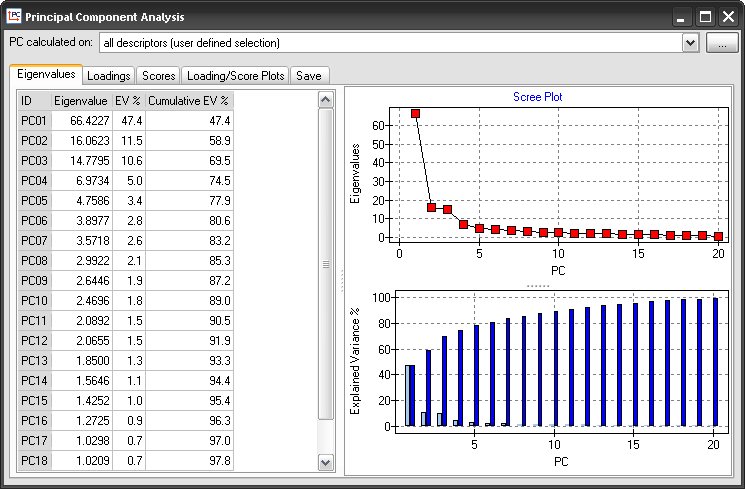
In the 'Eigenvalues' tab, the user can see the eigenvalues, the percentage of explained variance (EV %) and the percentage of cumulative explained variance (Cumulative EV %) for each principal component. Dragon automatically calculates a maximum number of components equal to 20. Moreover, the plot of eigenvalues (Scree plot) and the plots of cumulative and explained variance are provided on the right of the tab. These plots can be edited and exported as figures. Moreover, in the scree plot it is possible to see the significant number of components selected by different criteria by right clicking the mouse and then choosing 'Significant Components'.
Analyse loadings and score matrices
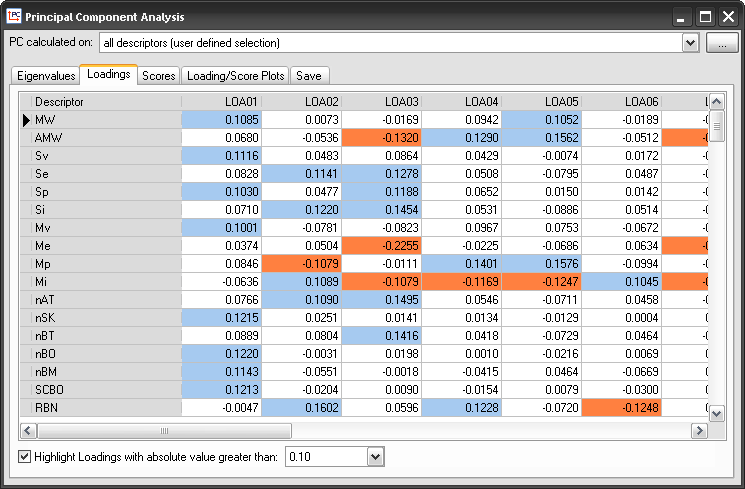
In the 'Loadings' and 'Scores' tabs, the user can see the values of PCA loadings and scores for each descriptor and molecule, respectively. Note that in the loading matrix, it is possible to highlight all the loadings with absolute values higher than a predefined threshold. This threshold can be set in the corresponding drop-down list placed at the bottom of the tab.
Analyse score and loading plots
In the 'Loading/Score plot' tab, the user can contemporaneously see the plots of scores and loadings. In these plots:
| ▪ | it is possible to decide the components to be plotted by means of the drop-down lists placed at the bottom of the tab; |
| ▪ | by right clicking the mouse on the plots, it is possible to edit and export them as figures; in the loading plot, it is also possible to show/hide unit circle and descriptor rays. |
| ▪ | the molecule/descriptor names can be seen by placing the mouse on the points in the score/loading plots; |
| ▪ | it is possible to open the molecule viewer of a specific molecule by double clicking the corresponding point in the score plot; |

In the 'Save' tab, results obtained by means of PCA can be saved. In order to do that:
| 1. | select the PCA analyses to be saved from the list; |
| 2. | check the results of each PCA that should be saved (eigenvalues, score values, loading values); |
| 4. | click the 'save ' button |
The PCA results will be exported in a text file.