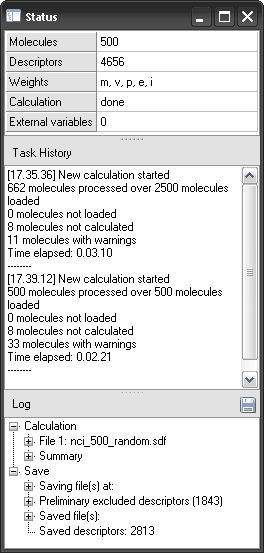
The 'Status' window can be opened by clicking 'Status window' in the 'View' menu of the main menu bar. This window displays information about the work session. It is composed of three parts.
General
In the upper part of the 'Status' window basic information about the current work session are displayed:
| ▪ | the number of loaded molecules, |
| ▪ | the number of selected molecular descriptors, |
| ▪ | the list of selected atomic weighting schemes, |
| ▪ | the calculation status (done/not done), |
| ▪ | the number of uploaded external variables. |
Task History
This frame contains a short summary of each calculation performed during a work session:
| ▪ | calculation start time, |
| ▪ | the number of successfully processed molecules, |
| ▪ | the number of not loaded molecules, that is, those molecules that cannot be loaded by Dragon due to unusual or wrong syntaxes in the structure file, |
| ▪ | the number of molecules loaded but not correctly processed, e.g. molecules in salt form, for which no molecular descriptor was calculated; |
| ▪ | the number of processed molecules with warnings, for which some descriptors could be missing; |
| ▪ | the time elapsed during descriptor calculation. |
The text in the Task History can be copied to the clipboard and exported from Dragon.
Log
If errors in descriptor calculation occur for a molecule, the molecule is not automatically skipped but some descriptor values could be missing. The list of molecules with errors or missing values in calculation is shown in the 'Log' area of the 'Status' window together with the error type. Also the molecular descriptor blocks for which calculation cannot be performed are listed in the Log. Finally, the calculation summary (that corresponds to the information collected in the Task History) is reported at the end of the Log. All the information shown in the Log area can be stored into a text file and exported by clicking the upper right button in the Log frame.